To verify that your system's fasp transfer can fulfill the maximum bandwidth capacity, prepare a client machine to connect to this computer, and do the following tests:
-
Start a transfer with Fair transfer policy
On the client machine, open the user interface and start a transfer. Go to the Details to open the Transfer Monitor.
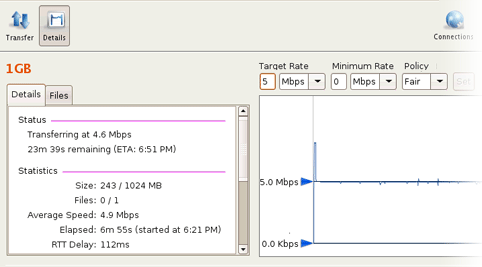
To leave more network resource for other high-priority traffics, use Fair policy and adjust the Target Rate and Minimum Rate rate by sliding the arrows or enter the values.
-
Test the maximum bandwidth
This test will typically occupy a majority of the network's bandwidth. It is recommended that this test be performed on a dedicated file transfer line or during a time of very low network activity.
Use Fixed policy for the maximum transfer speed. Start with a lower transfer rate and increase gradually toward the network bandwidth.
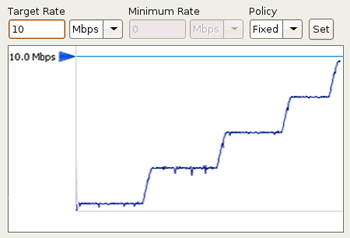
To improve the transfer speed, you may also upgrade the related hardware components:
| Component | Description |
|---|---|
| Hard disk | The I/O throughput, the disk bus architecture (e.g. RAID, IDE, SCSI, ATA, and Fiber Channel). |
| Network I/O | The interface card, the internal bus of the computer. |
| CPU | Overall CPU performance affects the transfer, especially when encryption is enabled. |