My Checkouts
In the course of your work, it may be easy to lose track of your checkouts, especially if
- You check out a large number of files.
- Your checked-out content comes from several different locations in Aspera on Cloud.
- Some time passes between checking out a file and checking it in.
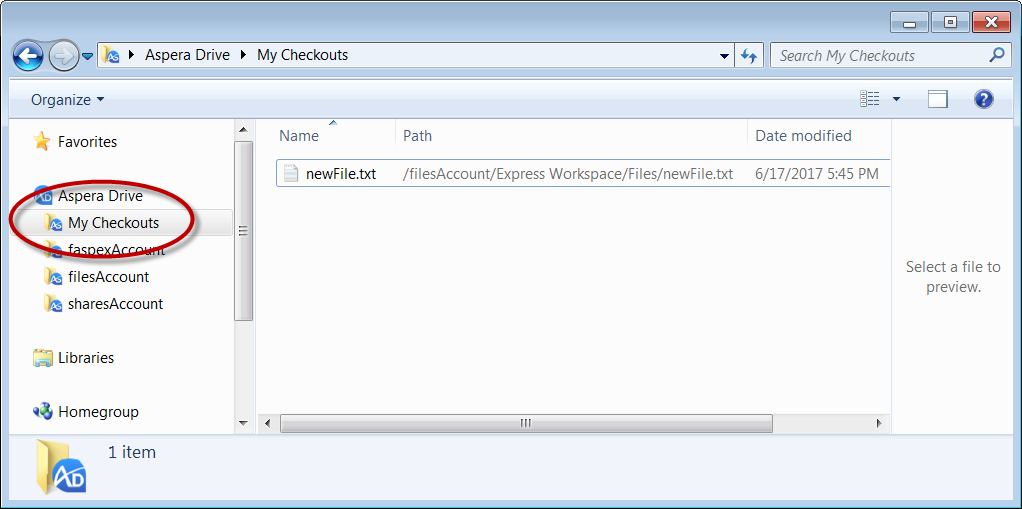
To see all of your current checkouts, click My Checkouts.
Moving, Renaming, and Deleting Checked-Out Content
You cannot move, rename, or delete a file or its parent folder while you (or any other user) has it checked out. Doing so causes misalignments in the master repository in Aspera on Cloud.
Instead, you can
- Check the content back in (or revert your checkout).
- Move, rename, or delete the content in Aspera on Cloud, once the file lock has been released. (That is, once the content is not checked out by you or another user.)
Full Paths in My Checkouts
For convenience, the My Checkouts area uses a flat structure (a simple list) to show the content you have checked out.
But you can also see the full path to the content's location in Aspera on Cloud through the Path column in Windows Explorer. If the Path column is not shown, right-click in the Explorer window and select View > Details. If Explorer is already in View > Details mode but does not show the Path column, refresh the Explorer window.