Within the Aspera Faspex Server Web UI, go to to view and/or modify your server's transfer settings, including HTTP fallback, default transfer rates, Aspera Connect browser plugin behavior and server-to-server relay outgoing bandwidth.
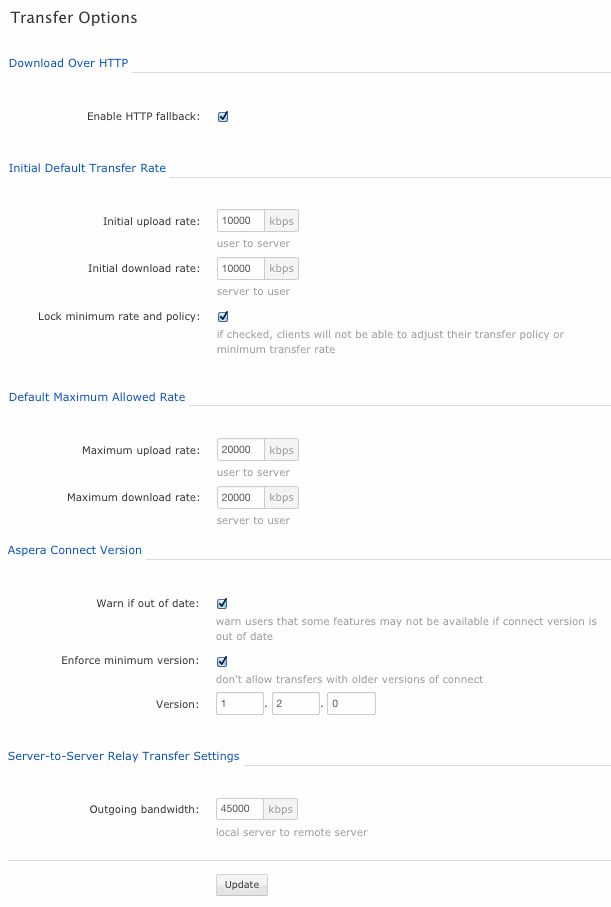
Download Over HTTP
| Configuration Option | Description |
|---|---|
| Enable HTTP fallback | Enable or disable the HTTP fallback feature, which provides a secondary transfer method for users whose UDP connection is lost or cannot be established. When HTTP fallback is enabled, the transfer will be continued over the HTTP protocol (or, if transfer encryption is enabled, over the HTTPS protocol). For additional information on configuring HTTP fallback, please refer to Configuring HTTP and HTTPS Fallback. |
Initial Default Transfer Rate
| Configuration Option | Description |
|---|---|
| Initial upload rate | The default fasp transfer upload speed in kbps (i.e. user to server) |
| Initial download rate | The default fasp transfer download speed in kbps (i.e. server to user) |
| Lock minimum rate and policy (checkbox) | When enabled, users will be unable to adjust their transfer policy or minimum transfer rate. |
Default Maximum Allowed Rate
| Configuration Option | Description |
|---|---|
| Maximum upload rate | The maximum fasp transfer upload speed in kpbs (i.e. user to server) |
| Maximum download rate | The maximum fasp transfer download speed in kbps (i.e. server to user) |
Aspera Connect Version
| Configuration Option | Description |
|---|---|
| Warn if out of date (checkbox) | When enabled, users will be warned when their Aspera Connect browser plugin is out-of-date. |
| Enforce minimum version (checkbox) | When enabled, users with a deprecated version of Aspera Connect will not be allowed to perform transfers (i.e., send and receive packages). |
| Version | Specify the minimum accepted version of Aspera Connect. |
Server-to-Server Relay Transfer Settings
| Configuration Option | Description |
|---|---|
| Outgoing bandwidth | If you have more than one Aspera Faspex server in your organization and are utilizing server-to-server relay, then you may specify the transfer bandwidth between servers. |
IMPORTANT NOTE: You must click the Update button to apply and save your changes.