Customize Faspex with the Custom CSS File
While Faspex does not yet support skinning, it is possible to modify some files in order to personalize colors and images of the Faspex interface.
Folders and Files Handling the Application Appearance
The public folder is located at: C:\Program Files (x86)\Aspera\Faspex\public Most of the pictures are located in the "images" sub-folder. The "stylesheets" sub-folder contains the faspex.css and bootstrap.css files. The .css files are located at:- faspex.css: C:\Program Files (x86)\Aspera\Faspex\public\stylesheets\faspex.css
- bootstrap.css: C:\Program Files (x86)\Aspera\Faspex\public\stylesheets\third-party\bootstrap\bootstrap.css
Important: Aspera does not recommend editing the faspex.css and bootstrap.css
files to personalize Faspex, because these files are not preserved when upgrading Faspex.
Instead, follow the instructions in Creating a Custom CSS File to create and modify the
customize.css file that takes precedence over these default files.
Customize Faspex Colors
Use the custom.css file created in Creating a Custom CSS File to change the color of the
global navigation bar, the header, and the active tab. For example, to change the Faspex
header and main navigation bar background colors to blue
(#1d2873):
/* MAIN GLOBAL NAV */
.main_tabs
{
  margin: auto;
  float: left;
  width: 100%;
  background: #1d2873;
}

/* Header */
div#header
{ width: 100%; height: 60px; color: white; background: #1d2873 }

/* Active Tab */
.main_tabs ul li a.selected {
background: linear-gradient(to top, #5aaafa 4px, #1d2873 4px)
}
Customize Subtitles
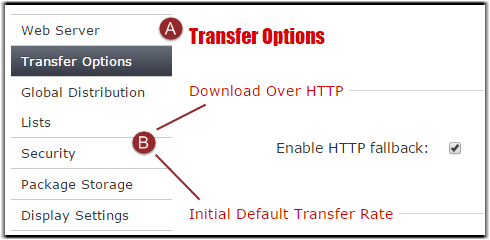
| Label | Description |
|---|---|
| A | Sub-menu Title |
| B | Section Titles |
A: Sub-menu Title
To change the font, size, and color of sub-menu titles, edit the following tags (defaults found in bootstrap.css):h1, h2, h3, h4, h5, h6 {
margin: 0;
font-family: Verdana, helvetica, sans-serif;
font-weight: bold;
color: inherit;
text-rendering: optimizelegibility;
}h1, h2, h3, h4, h5, h6 {
font-weight: normal;
line-height: normal;
margin-bottom: 20px;
}A: Titles
To change the font, size, and color of section titles, edit the following tags (defaults found in bootstrap.css):legend {
width: inherit;
font-size: 108%;
font-weight: normal;
background: transparent;
line-height: 1.5;
color: #1952bb;
margin: 12px 0;
padding-right: 5px;
border: 0;
}Customize Vertical Menus
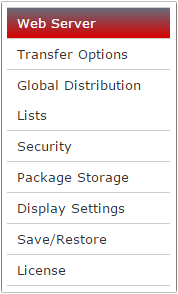
To change the color of tabs for the vertical menu, edit the following two sections (default found in faspex.css):
.v_menu li a {
 display:block;
 text-decoration:none;
 color:#333;
 line-height:30px;
 border-top:1px solid #ccc;
 padding-left:10px;
 cursor:pointer;
}
.v_menu .active a,
.v_menu .selected a {
 color:#fff;
 background-color:#343945;
 background-image: -moz-linear-gradient(top, #676c79, #343945);
 background-image: -webkit-gradient(linear, left top, left bottom, from(#676c79), to(#343945));
 filter:progid:DXImageTransform.Microsoft.gradient(startColorstr=#ff676c79,endColorstr=#ff343945);
 -ms-filter: "progid:DXImageTransform.Microsoft.gradient(startColorstr=#ff676c79,endColorstr=#ff343945)";
}