This section describes how to configure IBM Aspera Faspex to deny
all transfers except for ones initiated by or sent to permitted users. This is
accomplished by updating the global authorization settings for your installation of
IBM Aspera High-Speed Transfer Server (HSTS).
Go to Start menu > All Programs > Aspera > Enterprise Server >
Enterprise Server and then select Configuration >
Global > Authorization.
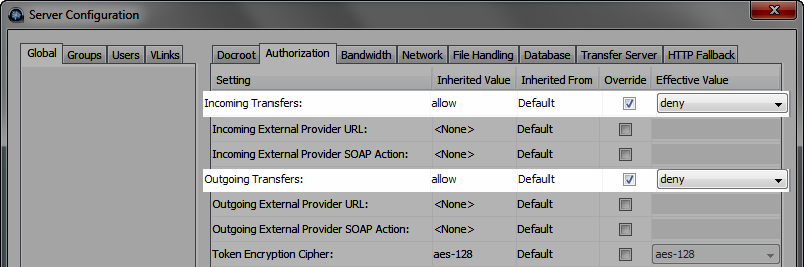
Select Override for both Incoming Transfers and
Outgoing Transfers. Change both settings to
deny. You can then set transfer permissions on an
individual user basis using the Users tab.
(Complete this step if your system is a dedicated FaspexServer and is not performing transfers
with IBM Aspera High-Speed Transfer Server or HSTS) Only allow user "faspex" within
HSTS
Launch IBM Aspera High-Speed Transfer Server by going to Start menu >
All Programs > Aspera > Enterprise Server > Enterprise
Server, and then select the
Configuration button and
Users tab. Ensure that faspex is the
only user listed.