Configuring HTTP and HTTPS Fallback
HTTP fallback serves as a secondary transfer method when the Internet connectivity required for Aspera FASP transfers (UDP port 33001, by default) is unavailable. When HTTP fallback is enabled and UDP connectivity is lost or cannot be established, the transfer will continue over the HTTP protocol. These instructions describe how to enable and configure HTTP/HTTPS fallback.
Prerequisites:
- To enable HTTP fallback for IBM Aspera Faspex, you
must configure the feature in both Faspex and the
associated transfer node that is running IBM Aspera High-Speed Transfer Server.
When Faspex and the HSTS are installed on the same machine, the Faspex installation process configures both automatically. When HSTS is remote, configure the transfer server and firewall ports in either of the following ways:
- Set HTTP/HTTPS to defaults ports (8080 + 8443) and open firewall ports on 8080/8443.
- Set HTTP/HTTPS to standard ports (80 + 443) and open firewall ports on 80/443.
Additionally, the transfer server fallback settings must match the Faspex fallback settings. If the settings don't match, Faspex returns a "Package creation failed" error. Ensure that transfer server has HTTP/HTTPS fallback enabled.
- Configure your HSTS web UI. For additional information on configuring different modes and testing, see the Aspera KB Article "HTTP fallback configuration, testing and troubleshooting."
- Your Aspera HTTP daemon () is running with sufficient privileges so that it can modify file ownership.
Limitations:
- Folders that are symbolic links cannot be downloaded directly by using HTTP fallback. Folders that are symbolic links are processed correctly when their parent folder is the source.
- HTTP fallback can only follow symbolic links. Settings in aspera.conf or in the command line are ignored.
- HTTP fallback attempts to transfer at the target rate but is limited by TCP.
- HTTP fallback does not support pre-post processing or inline validation.
Process:
-
(In HSTS) Configure HTTP/HTTPS fallback settings.
You can configure HTTP/HTTPS fallback from the HSTS GUI or by editing aspera.conf.
Configuring HTTP/HTTPS fallback from the GUI:
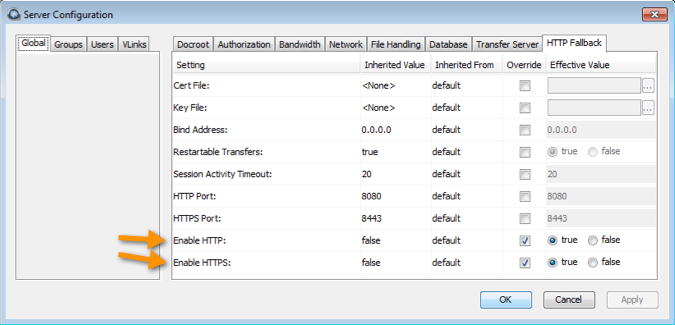
Launch the transfer server and go to Configuration > Global > HTTP Fallback.
Review the following settings:
- In the Enable HTTP row, select Override and set to true.
- If you want to allow fallback over HTTPS, in the Enable HTTPS row, select Override and set to true.
Configuring HTTP/HTTPS fallback by editing aspera.conf:
Run the following commands:
- To view the current HTTP settings in
aspera.conf:
$ asuserdata -b -t
To manually inspectaspera.conf, open it from the following directory: