The Activity Overview
| Item | Description |
|---|---|
| NAME | The transfer's name. |
| DETAILS | The transfer initiator, source, and destination. |
| START | This transfer's start time. |
| END | The estimated time of arrival, or the transfer completion time. |
| STATUS | Current status of this transfer. |
| AVG RATE | The transfer rate of the active transfer, or the average rate of a past transfer. |
| ACTIONS | Show all available actions. For example, pause and cancel for a running transfer or rerun for a past transfer. |
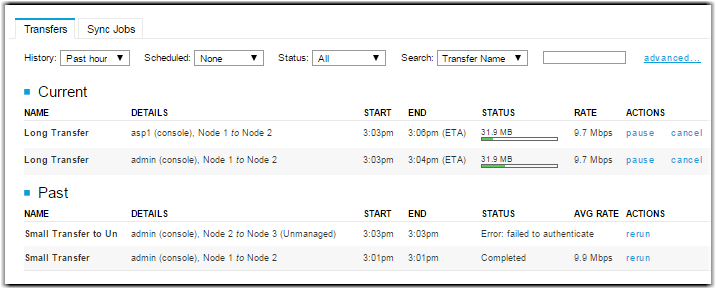
The Current panel lists all currently active transfers, including running and queued transfers. The Past panel shows previous transfers, including those that were completed, canceled, or those that generated errors.
| Item | Description |
|---|---|
| History | Select the time frame to display the started transfers. |
| Scheduled | Select the time frame to display the scheduled transfers. |
| Status | Select a specific transfer status to display. |
| Search | Search for keywords in transfer sessions. |