Introduction
The IBM Aspera Add-in for Microsoft Outlook is a client software option for IBM Aspera Faspex, which extends the full set of the Aspera high-speed transfer capabilities to Outlook users. Senders compose emails and attach files using the standard email workflow, with no additional steps needed.
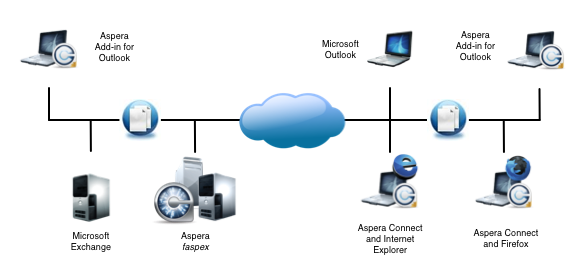
The Aspera Add-in includes the following features:
High-Speed FASP Transfers
- Transfers are powered by Aspera's unique FASP protocol. Attachments are sent at high speed, regardless of file size, distance, or network.
- Precise bandwidth control ensures that the entire allocated bandwidth is used to achieve maximum transfer speeds, while being fair to other critical network traffic.
- Transfer status and progress can be viewed, paused, and resumed with the IBM Aspera Connect Browser Plug-in.
No Limits on Email Attachments
- Email attachments can be of any size. There is virtually no limit since the attachments are sent using the FASP protocol, using the Faspex transfer server.
- Entire folders and directories can be sent, of any size, without requiring any compression.
Security
- Email attachments can be encrypted for additional security.
- Attachments remain encrypted on the Faspex transfer server and must be decrypted by the recipient using a passphrase.
Integration with Outlook
- The Aspera Add-in is installed on the client computer and is completely integrated with Microsoft Outlook.
- When a user clicks Send, the Aspera Add-in automatically sends the attachments to the recipient at high speed using Faspex, and sends the original email (minus the attachments) using Exchange, POP3, and so on.
- Attachments are sent directly from the Aspera client to the recipient using the Faspex transfer server.
- Once the transfer is initiated, the sender can return to their work while the transfer continues unattended in the background.
Configurable Options
- Threshold for file sizes — All attachments with a total size below the threshold are sent using the email server, while attachments with a total size above the threshold size are automatically sent using Aspera.
- Download location — Downloaded attachments can be automatically saved to a specified folder, or the user can be prompted for the directory location on each download.
- Encryption — Files can be kept encrypted on the server.
Compatible with Aspera Faspex, Connect, and Cargo
- Email attachments stored on a Faspex transfer server can be downloaded at high speed by the recipient directly from within Outlook using the Aspera Add-In.
- All recipients (that is, Outlook users with the Add-in, Outlook users without the Add-in, and web-based email users) receive a Faspex email with a link to the Faspex page from which they can download attachments. Outlook users have an additional benefit with the Add-in, in that they can download the attachments from Outlook when they view the email (that is, without having to open the Faspex link separately in their browsers).
- Recipients with a Faspex account and IBM Aspera Cargo can have attachments automatically downloaded to their computers.