When you browse a share, all files and directories within that share are displayed. 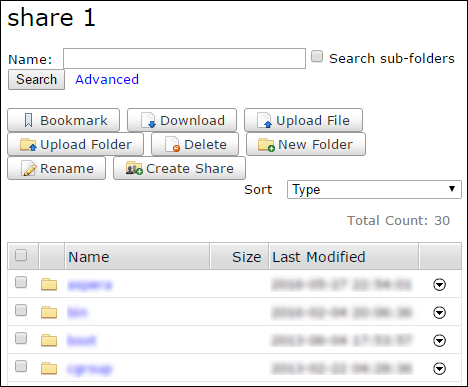
The name of the share appears at the top. The search bar enables you to search for specific
files or directories (for more information, see Searching Shares). When you select a file or directory in the share, you can click one of the buttons (for
example, Bookmark) to act on the share.
Note: You can only see buttons for
which you have authorization. If you believe that your authorizations are incorrect, contact
your system administrator.
Total Count displays the total
number of entries (files and directories) in the current share.The buttons perform the following functions:
| Button | Function |
|---|---|
| Bookmark | Create a shortcut to the selected directory. If you do not select any directory, the bookmark is the node's root directory. |
| Download | Download the selected directory or directories using the IBM Aspera Connect Browser Plug-In. For more information, see Transferring Files. |
| Upload File | Upload a file from another machine to this share using the IBM Aspera Connect. For more information, see Transferring Files. |
| Upload Folder | Upload a folder from another machine to this share using the IBM Aspera Connect. Users do not need permission to create new folders to upload directories. |
| Delete | Delete the selected directory or directories. |
| New Folder | Create a new directory in the share. |
| Rename | Rename an existing directory in the share. |