File handling settings, such as file block size, overwrite rules, and exclude pattern.
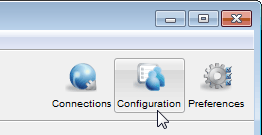
The File Handling configuration options can be found in the application's Configuration, under the Global, Groups, and Users tabs.
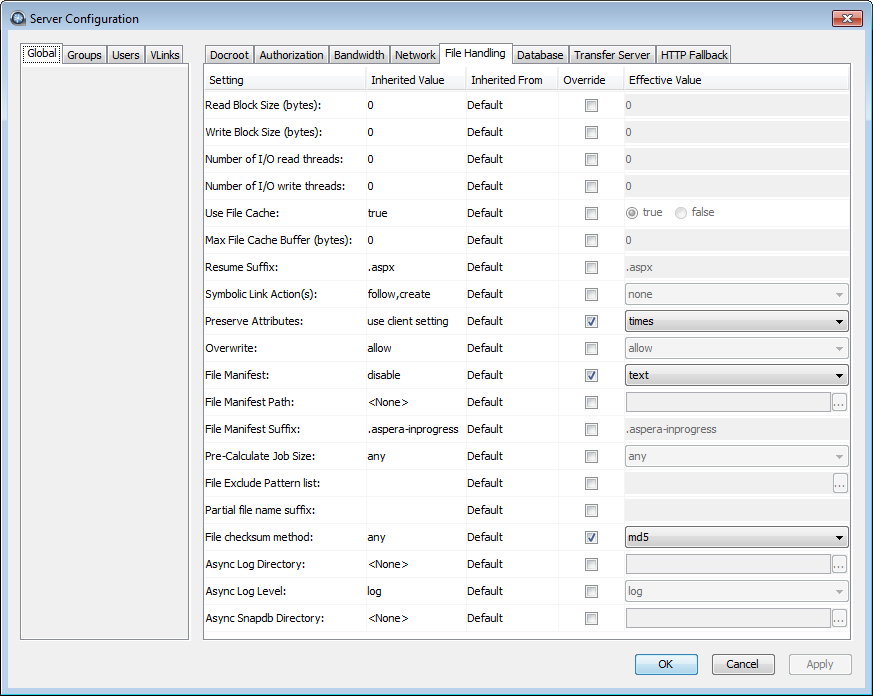
The following table lists all configuration options:
| Field | Description | Values | Default |
|---|---|---|---|
| Read Block Size (bytes) | This is a performance-tuning parameter for an Aspera sender (which only takes effect if the sender is a server). It represents the maximum number of bytes that can be stored within a block as the block is being transferred from the source disk drive to the receiver. The default of zero will cause the Aspera sender to use its default internal buffer size, which may be different for different operating systems. | positive integer, where 500MB or 524,288,000 bytes bytes is the maximum block size. | 0 |
| Write Block Size (bytes) | This is a performance-tuning parameter for an Aspera receiver (which only takes effect if the receiver is a server). It represents the maximum bytes within a block that an ascp receiver can write to disk. The default of zero will cause the Aspera receiver to use its default internal buffer size, which may be different for different operating systems. | positive integer, where 500MB or 524,288,000 bytes bytes is the maximum block size. | 0 |
| Number of I/O read threads | This is a performance-tuning parameter for an Aspera sender. It represents the number of threads the Aspera sender will use to read file contents from the source disk drive. It takes effect on both client and server, when acting as a sender. The default of zero will cause the Aspera sender to use its internal default, which may be different for different operating systems. | ||
| Number of I/O write threads | This is a performance-tuning parameter for an Aspera receiver. It represents the number of threads the Aspera receiver will use to write the file contents to the destination disk drive. It takes effect on both client and server, when acting as a receiver. The default of zero causes the Aspera receiver to use its internal default, which may be different for different operating systems. | ||
| Use File Cache | This is a performance tuning parameter for an Aspera receiver. Enable or disable per-file memory caching at the data receiver. File level memory caching improves data write speed on Windows platforms in particular, but will use more memory. We suggest using a file cache on systems that are transferring data at speeds close to the performance of their storage device, and disable it for system with very high concurrency (because memory utilization will grow with the number of concurrent transfers). |
|
true |
| Max File Cache Buffer (bytes) | This is a performance tuning parameter for an Aspera receiver. This value corresponds to the maximal size allocated for per-file memory cache (see Use File Cache). Unit is bytes. The default of zero will cause the Aspera receiver to use its internal buffer size, which may be different for different operating systems. | positive integer | 0 |
| Resume Suffix | File name extension for temporary metadata files used for resuming incomplete
transfers. Each data file in progress will have a corresponding metadata file
with the same name plus the resume suffix specified by the receiver. Metadata
files in the source of a directory transfer are skipped if they end with the
sender's resume suffix. Note: When you change the resume suffix,
you need to restart the Aspera Sync service in order for hot folders to pick
new settings up. Go to , then click Aspera Sync and click
Restart.
|
text string | .aspx |
| Symbolic Link Actions | Actions to be taken upon encountering a symbolic link on the server side. The action to take depends on both the platform and the particular application context. Combinations of choices are logically OR'ed before use. For example, use none alone to mean skip, and shut out other choices; when both follow and follow_wide are present, the latter is recognized. |
|
follow,create |
| Preserve Attributes | Configure file creation policy. When set to none, do not preserve the
timestamp of source files. When set to times, preserve the timestamp of
the source files at destination. Note: For Limelight storage, only the preservation of modification time is
supported.
|
|
blank |
| Overwrite | Overwrite is an Aspera server setting that determines whether Aspera clients are allowed to overwrite files on the server. By default it is set to allow, meaning that clients uploading files to the servers will be allowed to overwrite existing files as long as file permissions allow that action. If set to deny, clients uploading files to the server will not be able to overwrite existing files, regardless of file permissions. |
|
allow |
| File Manifest | When set to text a text file "receipt" of all files within each transfer session is generated. If set to disable, no File Manifest is created. The file manifest is a file containing a list of everything that was transferred in a given transfer session. The filename of the File Manifest itself is automatically generated based on the transfer session's unique ID. The location where each manifest is written is specified by the File Manifest Path value. If no File Manifest Path is specified, the file will be generated under the destination path at the receiver, and under the first source path at the sender. |
|
none |
| File Manifest Path |
Specify the location to store manifest files. Can be an absolute path or a path relative to the transfer user's home. Note:
File manifests can only be stored locally. Thus, if you are using S3, or other
non-local storage, you must specify a local manifest path.
|
text string | blank |
| File Manifest Suffix | Specify the suffix of the manifest file during file transfer. | text string | .aspera-inprogress |
| Pre-Calculate Job Size | Configure the policy of calculating total job size before data transfer. If set to any, follow client configurations (-o PreCalculateJobSize={yes|no}). If set to no, disable calculating job size before transferring. If set to yes, enable calculating job size before transferring. |
|
any |
| File Exclude Pattern List | Exclude files or directories with the specified pattern in the transfer. Add multiple
entries for more exclusion patterns. Two symbols can be used in the setting of
patterns:
This option applies only to the client side, even though it is set from the Server Configuration dialog. Servers cannot exclude files or directories uploaded or downloaded by remote clients.  |
text entries | blank |
| Partial File Name Suffix |
Filename extension on the destination computer while the file is being transferred. Once the file has been completely transferred, this filename extension is removed. If hot folders will be used as the upload destination, the partial filename suffix should be set even if it means setting it to the default value .partial. Setting it prevents partial files from being downloaded from a hot folder. Note: When you change the partial file name setting, you need to restart the
Aspera Sync service in order for hot folders to pick up new settings. Go to and restart Aspera Sync.
Note:
This option only takes effect when it is set on the receiver side.
|
text string | blank |
| File checksum method | The type of checksum to calculate for transferred files. The content of transfers can be verified by comparing the checksum value at the destination with the value read at the source. Check the override box and for the effective value, select md5, sha1, or any. For details on configuring and using the checksum feature, see Reporting Checksums. | ||
| Async Log Directory | An alternative location for the Sync server's log files. If empty, log files go to the default location, or the location specified by the client with -R. | ||
| Async Log Level | The amount of detail in the Sync server activity log. Choices are disable, dbg1, and dbg2. | ||
| Async Snapdb Directory | An alternative location for the Sync server's snapshot DB files. |