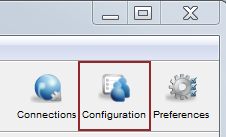
To set the Bandwidth configuration options, including target transfer rates, transfer policies, and vlinks, click Configuration and modify values for the Global, Groups, and Users under their respective Bandwidth tabs. Select Override in the option's row to set an effective value.
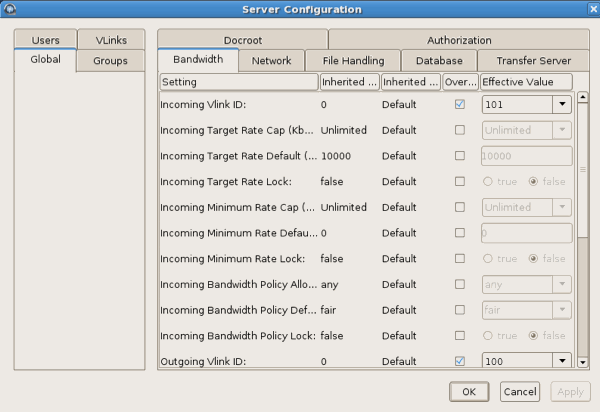
The following table lists all configuration options:
| Field | Description | Values | Default |
|---|---|---|---|
| Incoming Vlink ID | Set the Vlink ID for incoming transfers. Vlinks are a mechanism to define aggregate transfer policies. The default setting of 0 disables Vlinks. One Vlink—the virtual equivalent of a network trunk—represents a bandwidth allowance that may be allocated to a node , a group, or a user. Vlink ID is defined in each Vlink created in Aspera Console. Vlink ID is a unique numeric identifier. | predefined value | 0 |
| Incoming Target Rate Cap (Kbps) | Set the Target Rate Cap for incoming transfers. The Target Rate Cap is the maximum target rate that a transfer can request, in kilobits per second. No transfer may be adjusted above this setting, at any time. The default setting of unlimited signifies no Target Rate Cap. Clients requesting transfers with initial rates above the Target Rate Cap will be denied. | positive integer | unlimited |
| Incoming Target Rate Default (Kbps) | Set the initial rate for incoming transfers, in kilobits per second. Users may be able to modify this rate in real time, if allowed. This setting is not relevant to transfers with a Policy of fixed. | positive integer | 10000 |
| Incoming Target Rate Lock | Set to false to allow users to adjust the transfer rate once an incoming transfer is started. Set to true to prevent real-time modification of the transfer rate. | true or false | false |
| Incoming Minimum Rate Cap (Kbps) | Set the Minimum Rate Cap for incoming transfers. The Minimum Rate Cap is a level, specified in kilobits per second, below which an incoming transfer will not slow, despite network congestion or physical network availability. The default value of unlimited effectively turns off the Minimum Rate Cap. | positive integer or unlimited | unlimited |
| Incoming Minimum Rate Default (Kbps) | Set the initial minimum rate for incoming transfers, in kilobits per second. Users may be able to modify this rate in real time, if allowed. This setting is not relevant to transfers with a Policy of fixed. | positive integer | 0 |
| Incoming Minimum Rate Lock | Set to false (default) to allow users to adjust the minimum transfer rate once an incoming transfer is started. Set to true to prevent real-time modification of the minimum transfer rate. This setting is not relevant to transfers with a Policy of Fixed. | true or false | false |
| Incoming Bandwidth Policy Default | Set the default Bandwidth Policy for incoming transfers. The default policy value may
be overridden by client applications initiating transfers.
|
fixed, high, fair / regular, low, or any | fair |
| Incoming Bandwidth Policy Allowed | Set the allowed Bandwidth Policy for incoming transfers. Aspera transfers use fixed, high, fair and low policies to accommodate network-sharing requirements. When set to any, the server will not deny any transfer based on policy setting. When set to high, transfers with a Policy of high and less aggressive transfer policies (e.g. fair or low) will be permitted. When set to fair, transfers of fair and low will be permitted, while fixed transfers will be denied. When set to low, only transfers with a Bandwidth Policy of low will be allowed. | fixed, high, fair / regular, low, or any | any |
| Incoming Bandwidth Policy Lock | Set to false (default) to allow users to adjust the Bandwidth Policy once an incoming transfer is started. Set to true to prevent real-time modification of the Bandwidth Policy. | true or false | false |
| Outgoing Vlink ID | Set the Vlink ID for outgoing transfers. Vlinks are a mechanism to define aggregate transfer policies. The default setting of 0 disables Vlinks. One Vlink—the virtual equivalent of a network trunk—represents a bandwidth allowance that may be allocated to a node , a group, or a user. Vlink ID is defined in each Vlink created in Aspera Console. The Vlink ID is a unique numeric identifier. | predefined value | 0 |
| Outgoing Target Rate Cap (Kbps) | Set the Target Rate Cap for outgoing transfers. The Target Rate Cap is the maximum target rate that a transfer can request, in kilobits per second. No transfer may be adjusted above this setting, at any time. The default setting of unlimited signifies no Target Rate Cap. Clients requesting transfers with initial rates above the Target Rate Cap will be denied. | positive integer | unlimited |
| Outgoing Target Rate Default (Kbps) | Set the initial rate for outgoing transfers, in kilobits per second. Users may be able to modify this rate in real time, if allowed. This setting is not relevant to transfers with a Policy of Fixed. | positive integer | 10000 |
| Outgoing Target Rate Lock | Set to false (default) to allow users to adjust the transfer rate once an outgoing transfer is started. Set to true to prevent real-time modification of the transfer rate. | true or false | false |
| Outgoing Minimum Rate Cap (Kbps) | Set the Minimum Rate Cap for outgoing transfers. The Minimum Rate Cap is a level specified in kilobits per second, below which an outgoing transfer will not slow, despite network congestion or physical network availability. The default value of Unlimited effectively turns off the Minimum Rate Cap. | positive integer | unlimited |
| Outgoing Minimum Rate Default | Set the initial minimum rate for outgoing transfers, in kilobits per second. Users may be able to modify this rate in real time, if allowed. This setting is not relevant to transfers with a Policy of Fixed. | positive integer | 0 |
| Outgoing Minimum Rate Lock | Set to false (default) to allow users to adjust the minimum transfer rate once an outgoing transfer is started. Set to true to prevent real-time modification of the minimum transfer rate. This setting is not relevant to transfers with a Policy of Fixed. | true or false | false |
| Outgoing Bandwidth Policy Default | Set the default Bandwidth Policy for outgoing transfers. The default policy
value may be overridden by client applications initiating transfers.
|
fixed, high, fair, low | fair |
| Outgoing Bandwidth Policy Allowed | Set the allowed Bandwidth Policy for outgoing transfers. Aspera transfers use fixed, high, fair and low policies to accommodate network-sharing requirements. When set to any, the server will not deny any transfer based on policy setting. When set to high, transfers with a Policy of high and less aggressive transfer policies (e.g. fair or low) will be permitted. When set to fair, transfers of fair and low will be permitted, while fixed transfers will be denied. When set to low, only transfers with a Bandwidth Policy of low will be allowed. | fixed, high, fair (regular), low, or any | any |
| Outgoing Bandwidth Policy Lock | Set to false (default) to allow users to adjust the Bandwidth Policy once an outgoing transfer is started. Set to true to prevent real-time modification of the Bandwidth Policy. | true or false | false |