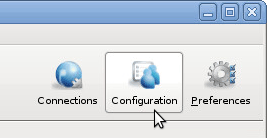
To set the File Handling configuration options, including file block size, overwrite rules, andt exclude pattern, click Configuration and modify values for the Global, Groups, and Users under their respective File Handling tabs. Select Override in the option's row to set an effective value.
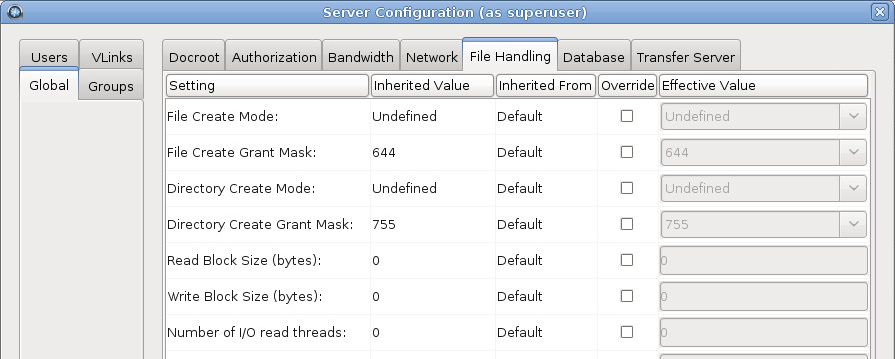
The following table lists all configuration options:
| Field | Description | Values | Default |
|---|---|---|---|
| Run at File Start | Validate using the specified method when starting a file (before file transfer starts). For more information on inline file validation, see Configuring Inline File Validation . | uri, lua_script, or none | none |
| Run at File Stop | Validate using the specified method when file transfer is complete and file is closed. For more information on inline file validation, see Configuring Inline File Validation. | uri, lua_script, or none | none |
| Run at Session Start | Validate using the specified method when an ascp session starts. For more information on inline file validation, see Configuring Inline File Validation. | lua_script or none | none |
| Run at Session Stop | Validate using the specified method when an ascp session ends. For more information on inline file validation, see Configuring Inline File Validation. | lua_script or none | none |
| Run when Crossing File Threshold (Validation Threshold) | Validate using the specified method when a set threshold in the file transfer is
reached. The threshold must be specified by editing
aspera.conf. For more information on inline file
validation, see Configuring Inline File Validation. Note: For threshold validation, it is possible for the file transfer to complete before the file threshold validation response comes back (because ascp doesn't pause file transfers during file threshold validation); therefore, a complete file transfer could happen even with validation failure. |
uri, lua_script, or none | none |
| Base64-Encoded Lua Action Script | For Lua API validation, the path to the base64-encoded Lua script. This value or File Path to Lua Action Script must be defined if any of the following values are set to lua_script: Run at File Start, Run at File Stop, Run at Session Start, Run at Session Stop, Run when Crossing File Threshold. If both this option and File Path to Lua Action Script option are defined, this value is ignored. For more information on inline file validation, see Configuring Inline File Validation. | Base64-encoded string | blank |
| File Path to Lua Action Script | For Lua API validation, the path to the Lua script. This value or Base64-Encoded Lua
Action Script must be defined if any of the following values are set to
lua_script:
If both this option and the Base64-Encoded Lua Action Script option are defined, this value is used. For more information on inline file validation, see Configuring Inline File Validation. |
Filepath | blank |
| File Create Mode | Set the file creation mode (permissions). If specified, create files with these permissions (for example, 0755), irrespective of File Create Grant Mask and permissions of the file on the source computer. Only takes effect when the server is a non-Windows receiver. | positive integer (octal) | undefined |
| File Create Grant Mask | Set the mode for newly created files if File Create Mode is not specified. If specified, file modes will be set to their original modes plus the Grant Mask values. Only takes effect when the server is a non-Windows receiver and when File Create Mode is not specified. | positive integer (octal) | 644 |
| Directory Create Mode | Set the directory creation mode (permissions). If specified, create directories with these permissions irrespective of Directory Create Grant Mask and permissions of the directory on the source computer. Only takes effect when the server is a non-Windows receiver. | positive integer (octal) | undefined |
| Directory Create Grant Mask | Set the mode for newly created directories if Directory Create Mode is not specified. If specified, directory modes will be set to their original modes plus the Grant Mask values. Only takes effect when the server is a non-Windows receiver and when Directory Create Mode is not specified. | positive integer (octal) | 755 |
| Read Block Size (bytes) | Set the maximum number of bytes that can be stored within a block as the block is being transferred from the source disk drive to the receiver. The default of zero causes the Aspera sender to use its default internal buffer size, which may vary by operating system. This is a performance-tuning parameter for an Aspera sender (which only takes effect if the sender is a server). | positive integer, where 500MB or 524,288,000 bytes is the maximum block size. | 0 |
| Write Block Size (bytes) | Set the maximum bytes within a block that an ascp receiver can write to disk. The default of zero causes the Aspera receiver to use its default internal buffer size, which may vary by operating system. This is a performance-tuning parameter for an Aspera receiver (which only takes effect if the receiver is a server). | positive integer, where 500MB or 524,288,000 bytes is the maximum block size. | 0 |
| Number of I/O read threads | Set the number of threads the Aspera sender uses to read file contents from the source disk drive. It takes effect on both client and server, when acting as a sender. The default of zero causes the Aspera sender to use its internal default, which may vary by operating system. This is a performance-tuning parameter for an Aspera sender. | positive integer | 0 |
| Number of I/O Write Threads | Set the number of threads the Aspera receiver uses to write the file contents to the destination disk drive. It takes effect on both client and server, when acting as a receiver. The default of zero causes the Aspera receiver to use its internal default, which may vary by operating system. This is a performance-tuning parameter for an Aspera receiver. | positive integer | 0 |
| Number of Dir Scanning Threads | Set the number of threads the Aspera sender uses to scan directory contents. It takes effect on both client and server, when acting as a sender. The default of zero causes the Aspera sender to use its internal default. This is a performance-tuning parameter for an Aspera sender. | positive integer | 0 |
| Number of Metadata Threads | Set the number of threads the Aspera receiver uses to create directories or 0 byte files. It takes effect on both client and server, when acting as a receiver. The default of zero causes the Aspera receiver to use its internal default, which may vary by operating system. This is a performance-tuning parameter for an Aspera receiver. | positive integer | 0 |
| Number of Worker Threads | Set the number of threads the Aspera sender and receiver use to delete files. This is a performance-tuning parameter. | positive integer | 0 |
| Sparse File Checking | Set to true to enable sparse file checking, which tells the Aspera receiver to avoid writing zero blocks and save disk space. The default of false to tell the Aspera reciever to write all the blocks. This is a performance-tuning parameter for an Aspera receiver. | true or false | false |
| Behavior on Attr Error |
Set behavior for when operations attempt to set or change file attributes (such as POSIX ownership, ACLs, or modification time) and fail. Setting to yes returns an error and causes the operation to fail. Setting to no logs the error and the operation continues |
no or yes | yes |
| Compression Method for File Transfer | Set the compression method to apply to transfers. It applies to both the client and server. | lz4, qlz, zlib, or none | lz4 |
| Use File Cache | Set to true (default) to enable per-file memory caching at
the data receiver. File level memory caching improves data write speed on
Windows platforms in particular, but uses more memory. This is a performance
tuning parameter for an Aspera receiver. Aspera suggests using a file cache on systems that are transferring data at speeds close to the performance of their storage device, and disable it for system with very high concurrency (because memory utilization will grow with the number of concurrent transfers). |
true or false | true |
| Max File Cache Buffer (bytes) | Set the maximal size allocated for per-file memory cache (see Use File Cache) in bytes. The default of zero will cause the Aspera receiver to use its internal buffer size, which may be different for different operating systems. This is a performance tuning parameter for an Aspera receiver. | positive integer | 0 |
| Resume Suffix | Set the file name extension for temporary metadata files used for resuming incomplete transfers. Each data file in progress will have a corresponding metadata file with the same name plus the resume suffix specified by the receiver. Metadata files in the source of a directory transfer are skipped if they end with the sender's resume suffix. | text string | .aspx |
| Symbolic Link Actions | Set the actions to be taken upon encountering a symbolic link on the server side. The
action to take depends on both the platform and the particular application
context. Combinations of choices are logically OR'ed before use. For example,
use none alone to mean skip, and shut out other choices; when
both follow and follow_wide are present, the
latter is recognized. To set a combination of actions, you must manually edit the configuration file aspera.conf in a text editor with administrative privileges. Find the file in the following location: /opt/aspera/etc/aspera.conf Aspera recommends you set one value in the GUI to create the entry, then manually add other values. Save then validate your edits by running the following command: # /opt/aspera/bin/asuserdata -v |
none, create, follow, follow_wide, or any combination of the above delimited by commas | follow,create |
| Preserve Attributes | Set the file creation policy. Set to none to not preserve the
timestamps of source files. Set to times to preserve the
timestamp of the source files at destination. Note: For Limelight storage, only the preservation of modification time is supported. |
none or times | blank (use the client setting) |
| Overwrite | Set to allow to allow Aspera clients to overwrite existing files on
the server, as long as file permissions allow that action. If set to deny, clients who upload files to the server cannot overwrite existing files, regardless of file permissions. |
allow or deny | allow |
| File Manifest | Set to text to generate a text file "receipt" of all files within each transfer session. Set to disable to not create a File Manifest. The file manifest is a file containing a list of everything that was transferred in a given transfer session. The filename of the File Manifest itself is automatically generated based on the transfer session's unique ID. The location where each manifest is written is specified by the File Manifest Path value. If no File Manifest Path is specified, the file will be generated under the destination path at the receiver, and under the first source path at the sender. | text, disable, or none | none |
| File Manifest Path | Specify the location to store manifest files. Can be an absolute path or a
path relative to the transfer user's home. Note: File manifests can only be stored locally. Thus, if you are using S3, or other non-local storage, you must specify a local manifest path. |
text string | blank |
| File Manifest Suffix | Specify the suffix of the manifest file during file transfer. | text string | .aspera-inprogress |
| Pre-Calculate Job Size | Set to yes to enable calculating job size before transferring. Set to no to disable calculating job size before transferring. Set to any to follow client configurations. | yes, no, or any | any |
| Convert Restricted Windows Characters | To enable the replacement of reserved Windows characters in file and directory names with a non-reserved character, set to the single byte, non-restricted character that will be used for the replacement. Only applies to files written to the local Windows file system; to enable on the peer it must be set on the peer's system. | single-byte, non-restricted character | blank |
| File Filter Pattern List | Exclude or include files and directories with the specified pattern in the transfer.
Add multiple entries for more inclusion/exclusion patterns. To specify an
inclusion, start the pattern with '+ ' (+ and a whitespace). To specify an
exclusion, start the pattern with '- ' (- and a whitespace). Two symbols can be
used in the setting of patterns:
For details on specifying rules, see Applying Filters to Include and Exclude Files. This option applies only when the server is acting as a client. Servers cannot exclude files or directories uploaded or downloaded by remote clients. |
text entries | blank |
| Partial File Name Suffix | Set the filename extension on the destination computer while the file is
being transferred. Once the file has been completely transferred, this filename
extension is removed. Note: This option only takes effect when it is set on the receiver side. |
text string | blank |
| File Checksum Method | Set the type of checksum to calculate for transferred files. The content of transfers can be verified by comparing the checksum value at the destination with the value read at the source. | any, md5, sha1, sha256, sha384, or sha512 | any |
| Async Log Directory | Set an alternative location for the Sync server's log files. If empty, log files go to the default location, or the location specified by the client with -R. | filepath | blank |
| Async Log Level | Set the amount of detail in the Sync server activity log. | disable, log, dbg1, or dbg2 | log |
| Async Snapdb Directory | Set an alternative location for the Sync server's snapshot DB files. | filepath | blank |