Transfer Server Configuration
The transfer server uses the Aspera Central service to handle transfer requests. To set Transfer Server configuration options, including the address, persistent storage, and empty file handling:
- Open the application with root privileges.
- Click Configuration > Global > Transfer Server.
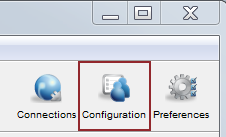
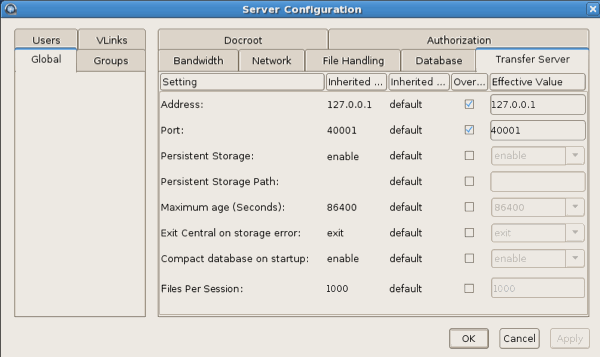
- Edit settings on the Transfer Server tab. Select Override in the option's row to set an effective value.
Transfer Server Settings Reference
| Setting | Description | Values | Default |
|---|---|---|---|
| Address | The network interface address on which the transfer server listens. The default value of 127.0.0.1 enables the transfer server to accept transfer requests from the local computer. If you set the address to 0.0.0.0, the transfer server can accept requests on all network interfaces. Alternatively, a specific network interface address may be specified. | Valid IPv4 address | 127.0.0.1 |
| Port | The port on which the transfer server accepts transfer requests. | Positive integer 1 - 65535 | 40001 |
| Persistent Storage | Retain data that is stored in the database between reboots of Aspera Central. | Enable or Disable | Enable |
| Persistent Storage Path | The location in which to store data between reboots of Aspera Central. If the path is a directory, then a file is created with the default name central-store.db. Otherwise, the file is named as specified in the path. | Valid system path | If the application is installed in the default location, then the path
is the following: /opt/aspera/var/ |
| Maximum Age (seconds) | Maximum allowable age (in seconds) of data to be retained in the database. | Positive integer | 86400 |
| Exit Central on Storage Error | The behavior of the Aspera Central server if a database write error occurs. | Ignore or Exit | Ignore |
| Compact Database on Startup | Enable or disable compacting (vacuuming) the database when the transfer server starts. | Enable or Disable | Enable |
| Files Per Session | The maximum number of files that can be retained for persistent storage. | Positive integer | 1000 |
| Ignore Empty Files | Set to true to block the logging of zero-byte files. | true or false | true |
| Ignore No-transfer Files | Set to true to block the logging of files that were not transferred because they exist at the destination. | true or false | true |
| Post-Transfer Validation Timeout | How many seconds to wait for a post-transfer validator to update the status of a file
before the file is released from the validator and its status is changed
back to "to_be_validated". This allows a file to be validated by a different
validator if the first validator stops working. For more information, see Out-of-Transfer File Validation. |
Positive integer | 300 |