Configuring Proxies
Use a proxy to connect to nodes for transfer initiation and node browsing.
Go to Configuration > Proxy to configure global HTTP and FASP proxies.
HTTP Proxy Vs. Fasp Proxy
Console supports using two types of proxies: HTTP and FASP proxies.
- Browsing a source or destination node using a Node API endpoint
- Retrieving a transfer token from the destination node when starting a token-based transfer
- Starting a transfer at the source node
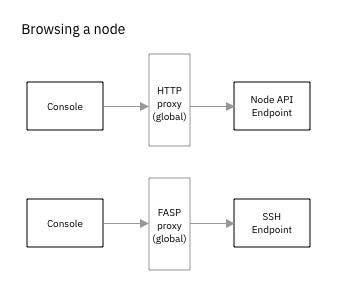
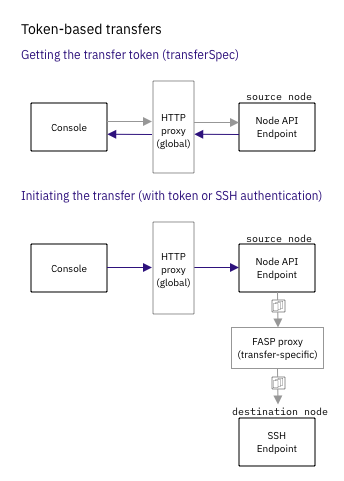
Configuring Proxies
Go to Configuration > Proxy to configure global HTTP and FASP proxies. You can enable one or both proxies. Both HTTP and FASP proxies take similar parameters:
| Field | Description |
|---|---|
| Address | Proxy IP address or domain name |
| Port | Proxy port number |
| SSL | (FASP proxy only) Enable or disable use of SSL |
| Username | Proxy username |
| Password | Proxy user password |
Creating Proxy Exclusion Rules
You can exclude a range of IP addresses and domain names from going through proxies by creating proxy exclusion rules. Define a rule by selecting the rule type and providing a range of addresses.
For example, you can exclude all IP Addresses starting with 192 and all domain names ending in ibm.com with the following two rules:
| Order | Rule Type | Address |
|---|---|---|
| 1 | Exclude | 192.* |
| 2 | Exclude | *.ibm.com |
| Order | Rule Type | Address |
|---|---|---|
| 1 | Include | 10.0.71.51 |
| 2 | Exclude | 10.* |
| Order | Rule Type | Address |
|---|---|---|
| 1 | Exclude | 10.* |
| 2 | Include | 10.0.71.51 |
If an address doesn't match any of the rules, Console applies the global proxy as usual.