Transfer notification emails are triggered by three transfer session events: start, completion, and error. These emails are generated from default or customized mail templates.
The following instructions describe how to configure the SMTP server and to create or modify your email templates.
-
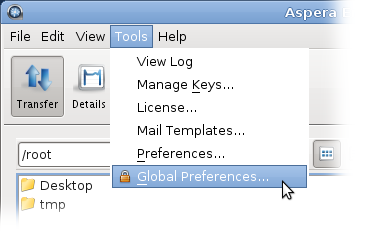
Open Global Preferences by clicking Tools >
Global Preferences.
-
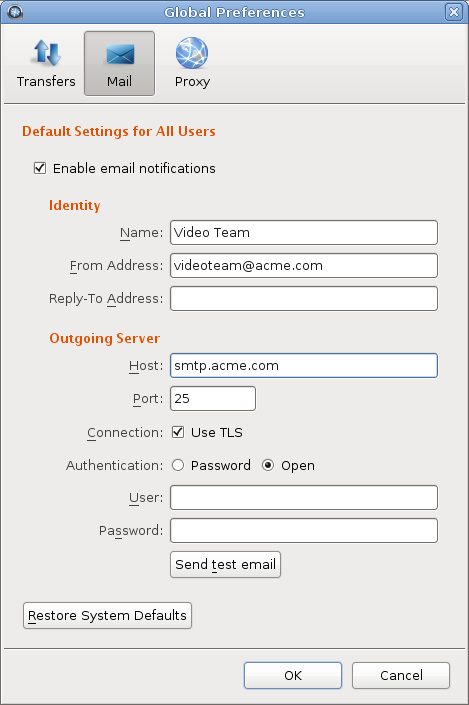
Click Mail to configure global email notification
settings.
To turn on email notifications for all users, select Enable email notifications. When email notifications are enabled you must enter the email address from which the notifications are sent in the From Address field and enter the outgoing email server host name in the Host field. The other values are optional. To test your settings, click Send test email, which sends a test message to the From Address.
-
Set your personal mail preferences.
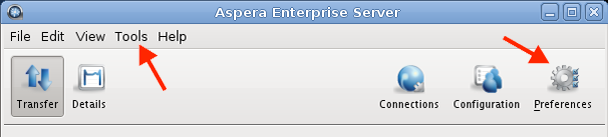
To override the global mail settings and configure personal mail settings, click Tools > Preferences or click Preferences:
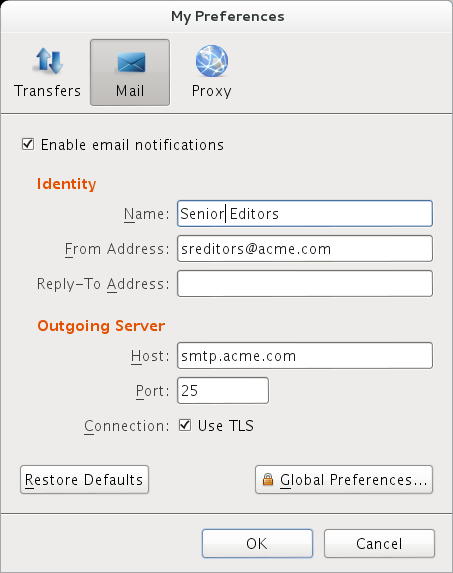
Click Mail and edit the inherited global default values. To restore your settings to global values, click Restore Defaults.
-
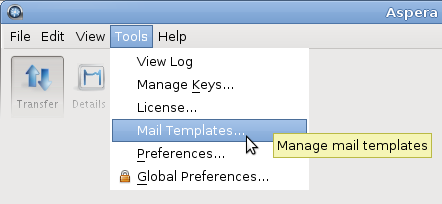
Open the Mail Templates window by clicking
Tools > Mail Templates.
-
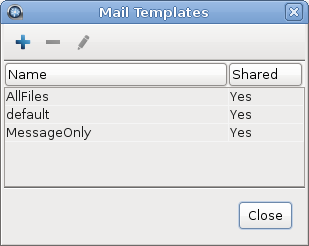
To create a new template, click
 , or to edit an existing template, select the template and click
-
Edit the template text.
The Edit Template window has four fields:
Field Description Name The template name. HTML The HTML mail body. Click Insert Image to insert an image into the template. The image is copied to the template directory. Preview the template by clicking Preview. Text The plain text mail body. Preview the template by clicking Preview. Access Select Share this template with all users on this computer to allow other system users to access this template. 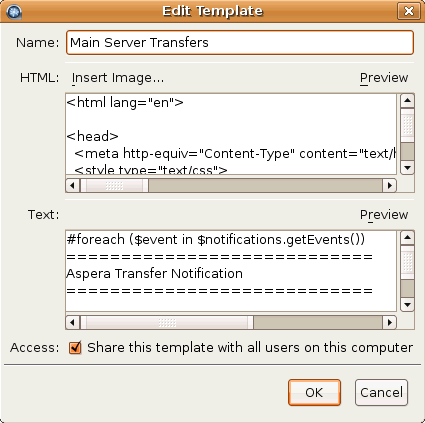
The mail template supports MIME (Multipurpose Internet Mail Extensions) multipart messages. You can edit both the HTML and plain text versions of the mail body. The templates are rendered by Apache Velocity (for more information, see the Apache Velocity User Guide at http://velocity.apache.org/). Templates use two predefined variables:
- $formatter - Contains some utility methods
- $notifications - Holds the transfer notifications
To iterate over notifications, use a foreach loop. A foreach loop generates content for each iteration of the loop. In the following example, a local $event variable is declared for use within the foreach loop:
#foreach ($event in $notifications.getEvents())
 ...
#end
To generate content only under specific conditions, use a conditional statement. To construct a conditional statement, use #if, #else, and #end, with the following syntax:
#if
 ...
#else
 ...
#end
All conditional statements are categorized in four parts: the conditional (what must occur to trigger the action), session information (what action is triggered), time, and statistics.
Conditional
Use conditional tests in an if statement. For example:
#if ($event.isFailed())
 ...
#end
Statement Description $event.isStarted() If the transfer session is started. $event.isCompleted() If the transfer session is completed. $event.isEnded() If the transfer session is ended. $event.isFailed() If the transfer session is failed. Session Information
Statement Description $event.getSourceHost() The source host name (or host address if the host name is not discoverable). $event.getSourceHostAddress() The source host address. $event.getSourcePaths() The source file path. $event.getDestinationHost() The destination host name (or host address if the host name is not discoverable). $event.getDestinationHostAddress() The destination host address. $event.getDestinationPath() The destination file path. $event.getInitiatingHost() The session-initiating host name (or host address if the host name is not discoverable). $event.getInitiatingHostAddress() The session-initiating host address. $event.getId() The session ID. $event.getName() The session name. $event.getType().getDescription() The session state. Three outputs: "STARTED", "FAILED", and "COMPLETED". $event.getUser() The transfer login. $event.getFiles() The files that are being transferred. Use this statement in a foreach loop: (Any text after ## is a comment) #foreach ($file in $event.getFiles()) ## $file is a new variable visible in this foreach loop. ## $file holds the complete file path and file name. ## $formatter.decodePath() is used to ensure a correct string decoding. $formatter.decodePath($file) #end
Use the counter $velocityCount in an if statement to limit the output file count. For example, to list only the first ten files:#foreach ($file in $event.getFiles()) #if ($velocityCount > 10) #break #end $file #end
$event.getMessage() The message that is entered in the email Message field. $event.getError() The error message. Time
Statement Description $formatter.date(var, "lang", "format") Formatting the date and time output. Enter three values in the parenthesis: - var is either $event.getStartTime() or $event.getEndTime()
- lang is an abbreviated language name; for example, en for English.
- format is the display format. Use these
symbols:
- yyyy The year; for example, 2010.
- MM Month of the year; for example, 03.
- dd Day of the month; for example, 26.
- HH Hour of the day; for example, 16.
- mm Minute.
- ss Second.
- z Time zone.
- EEE The abbreviated weekday name; for example, Fri.
"EEE, yyyy-MM-dd HH:mm:ss z"
shows Fri, 2010-03-26 16:19:01 PST.
$event.getStartTime() The session start time. $event.getEndTime() The session end time. Statistics
Statement Description $event.getSourceFileCount() The number of source files. $event.getCompletedFileCount() The number of files that successfully transferred. $event.getFailedFileCount() The number of files that failed to transfer. $event.getAverageRatePercentage() The average transfer rate in bps. Enclose this statement with $formatter.formatRate() to simplify the output. $event.getAverageLossPercentage() The average packet loss percentage. $event.getSourceSizeB() The source file size. Enclose this statement with $formatter.toBestUnit() to simplify the output. $event.getTransferredB() The transferred file size. Enclose this statement with $formatter.toBestUnit() to simplify the output. $event.getWrittenB() The destination file size. Enclose this statement with $formatter.toBestUnit() to simplify the output.
You can apply the notifications to a specific connection host or a transfer session. You can also customize the subject line of the notification emails. For details, see Using Transfer Notifications.