Authorization Configuration
The Authorization configuration options, include connection permissions, token key, and encryption requirements.
Note: For security, Aspera recommends denying incoming and outgoing transfers
globally, then allowing transfers by individual users, as needed. For a compilation of
server security best practices, see Aspera Ecosystem Security Best Practices.
- Open the application with root privileges.
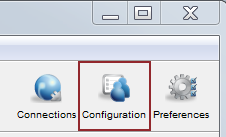
- Click Configuration > Authorization.
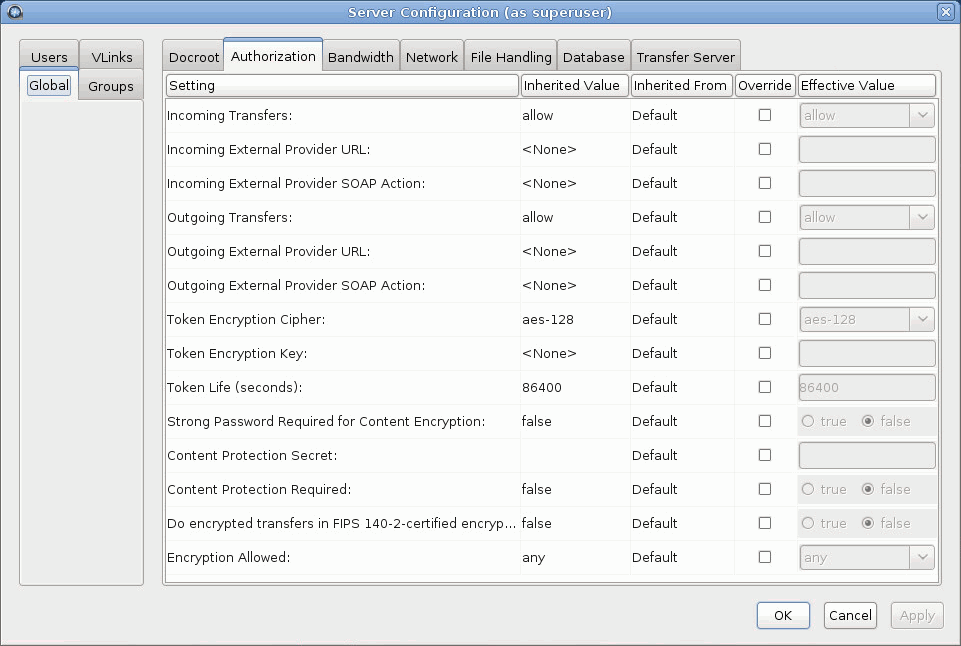
- Edit Global , Groups, and Users settings on their Authorization tabs. Select Override in the option's row to set an effective value. User settings take precedence over group settings, which take precedence over global settings.
Authorization Settings Reference
| Setting | Description | Values | Default |
|---|---|---|---|
| Incoming Transfers | To enable users to transfer to this computer, leave the default setting of allow. Set to deny to prevent transfers to this computer. Set to token to allow only transfers initiated with valid tokens to this computer. Token-based transfers are typically used by web applications such as Faspex and require a Token Encryption Key. | allow, deny, or token | allow |
| Incoming External Provider URL | Set the URL of the external authorization provider for incoming transfers. The default empty setting disables external authorization. Aspera servers can be configured to check with an external authorization provider. This SOAP authorization mechanism can be useful to organizations requiring custom authorization rules. Requires a value for Incoming External Provider SOAP Action. | HTTP URL | blank |
| Incoming External Provider SOAP Action | The SOAP action required by the external authorization provider for incoming transfers. Required if Incoming External Provider URL is set. | text string | blank |
| Outgoing Transfers | To enable users to transfer friom this computer, leave the default setting of allow. Set to deny to prevent transfers from this computer. Set to token to allow only transfers initiated with valid tokens from this computer. Token-based transfers are typically used by web applications such as Faspex and require a Token Encryption Key. | allow, deny, or token | allow |
| Outgoing External Provider URL | Set the URL of the external authorization provider for outgoing transfers. The default empty setting disables external authorization. Aspera servers can be configured to check with an external authorization provider. This SOAP authorization mechanism can be useful to organizations requiring custom authorization rules. Requires a value for Outgoing External Provider Soap Action. | HTTP URL | blank |
| Outgoing External Provider Soap Action | The SOAP action required by the external authorization provider for outgoing transfers. Required if Outgoing External Provider URL is set. | text string | blank |
| Token Encryption Cipher | Set the cipher used to generate encrypted transfer tokens. | aes-128, aes-192, or aes-256 | aes-128 |
| Token Encryption Key | Set the secret text phrase that is used to authorize those transfers configured to require token. Aspera recommends setting a token encryption key of at least 20 random characters. For more information, see Configuring Transfer Token Authorization in the GUI or Configuring Transfer Token Authorization from the Command Line. | text string | blank |
| Token Life (seconds) | Set the token expiration for users of web-based transfer applications. | positive integer | 86400 (24 hrs) |
| Strong Password Required for Content Encryption | Set to true to require that the password for content encryption (client-side encryption at rest) includes at least 6 characters, of which at least 1 is non-alphanumeric, at least 1 is a letter, and at least 1 is a digit. | true or false | false |
| Content Protection Secret | Enable server-side encryption-at-rest (EAR) by setting the passphrase. Files uploaded to the server are encrypted while stored there and are decrypted when they are downloaded. For more information, see Server-Side Encryption at Rest (EAR) or aspera.conf - Server-Side Encryption at Rest (EAR). | passphrase | (none) |
| Content Protection Required | Set to true to require that uploaded content be encrypted by
the client (enforce client-side encryption-at-rest). For more information, see Client-Side Encryption at Rest (EAR). |
true or false | false |
| Do encrypted transfers in FIPS-140-2-certified encryption mode | Set to true for ascp to use a FIPS
140-2-certified encryption module. When enabled, transfer start is delayed
while the FIPS module is verified. When you run ascp in FIPS mode (that is, <fips_enabled> is set to true in aspera.conf), and you use passphrase-protected SSH keys, you must use keys generated by running ssh-keygen in a FIPS-enabled system, or convert existing keys to a FIPS-compatible format using a command such as the following: Important: When set to true, all ciphers and hash
algorithms that are not FIPS compliant will abort
transfers. |
true or false | false |
| Encryption Allowed | Set the type of transfer encryption accepted by this computer. Set to
any to allow both encrypted and non-encrypted transfers to this
computer. Set to none to allow only non-encrypted transfers. Set to
a specific cipher to only allow transfers that use that cipher or stronger.
When set to aes-128, transfers that use
aes-128, aes-192, or
aes-256 are accepted; when set to
aes-256, only transfers that use
aes-256 are accepted and transfers that use
aes-128, aes-192, or
none are rejected. |
any, none, aes-128, aes-192, or aes-256 | any |